
 By Nana Muazin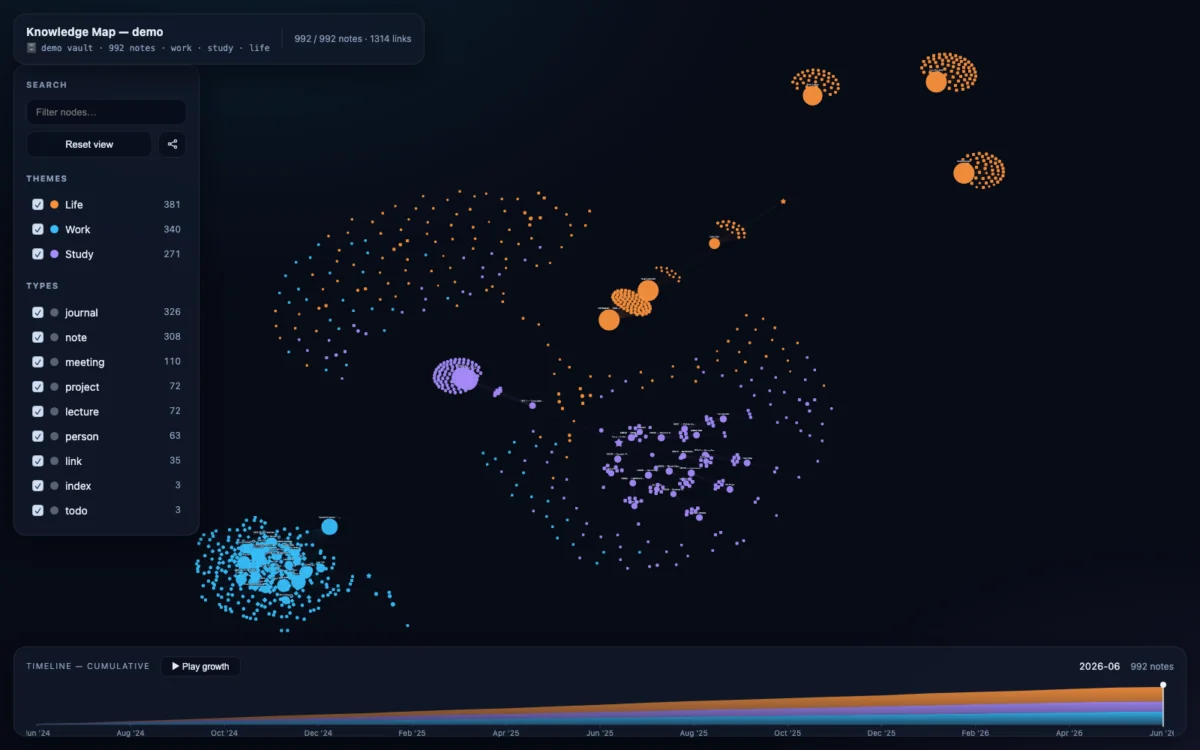
In the rapidly evolving landscape of personal knowledge management (PKM), the challenge has shifted from merely capturing information to meaningfully navigating it. As users accumulate thousands of Markdown notes across platforms like Obsidian, the "Second Brain" concept often runs into a physical constraint: it becomes difficult to see the forest for the trees. A new open-source project, brain-map-skill, is changing that dynamic by transforming static folders of notes into dynamic, force-directed, interactive knowledge maps.
The Architecture of Connection: Main Facts
At its core, brain-map-skill is a utility designed to convert a directory of Markdown files—the standard format for modern note-taking—into a standalone, interactive HTML visualization. Unlike traditional knowledge graphs that require complex database backends, server-side hosting, or proprietary cloud subscriptions, this tool generates a single, self-contained file.
The resulting visualization is more than a simple diagram; it is a feature-rich interface that includes:
- Force-Directed Graphing: Nodes represent individual notes, with edges signifying connections (wikilinks). The graph is color-coded by theme, allowing users to visually cluster their thoughts into categories such as work, study, and life.
- Temporal Scrubbing: A built-in timeline feature allows users to "scrub" through the history of their notes, effectively watching their knowledge base grow over time.
- Click-to-Inspect: Users can interact with nodes directly, opening a side panel that displays the content of the note without ever leaving the visualization.
The tool is remarkably lightweight, functioning as an "agent skill." Whether a user is employing AI assistants like Claude Code, OpenAI Codex, or Cursor, the brain-map-skill can be integrated directly into their workflow. For those who prefer a manual approach, a simple Python script handles the conversion from local directories to the browser-ready HTML format.
The Evolution of the Tool: A Chronology of Development
The development of brain-map-skill reflects a broader trend in the developer community toward "local-first" software. The project emerged from a need to bridge the gap between AI-generated knowledge and human-readable archives.
Phase 1: The Concept (Pre-Release)
The primary motivation was the frustration of "data rot"—the phenomenon where notes are written but never revisited because they are buried in file systems. The developer sought to create a tool that required zero server overhead, no external databases, and no complex configuration.
Phase 2: Initial Implementation
The first iteration focused on parsing YAML frontmatter and standard Markdown wikilinks. By leveraging existing standards, the tool ensured compatibility with popular platforms like Obsidian. The focus was on "zero-setup" functionality, which led to the creation of the pre-built demo file.
Phase 3: Optimization and Scaling
Early testers noted that while the tool worked well for small collections, larger vaults of 1,000+ notes required better layout algorithms. The developer addressed this by implementing an optional dependency on networkx, numpy, and scipy. This allows for pre-computed layouts that provide a cleaner, more professional visual aesthetic for larger data sets, while still allowing the tool to fall back on standard library Python for users who want to avoid extra installations.
Supporting Data: Technical Specifications and Performance
The technical prowess of brain-map-skill lies in its flexibility. It recognizes that different users have different levels of technical comfort.
The Two-Tiered Engine
| Setup Complexity | Performance/Visual Output |
|---|---|
| Standard (No dependencies) | Uses browser-based computation (Cytoscape cose); highly portable. |
Advanced (With requirements.txt) |
Uses networkx for pre-computed graph layouts; optimized for 1,000+ nodes. |
The tool’s ability to parse YAML frontmatter—specifically looking for tags and created fields—makes it inherently compatible with most modern note-taking workflows. By relying on [[wikilinks]], it taps into the associative nature of human thought, turning a static list of files into a web of interconnected ideas.
The "Zero Setup" Advantage
For users who are skeptical of installing new dependencies, the repository includes a pre-built demonstration. This demo contains 992 fictional notes, providing a sandbox for users to test the timeline scrubbing, filtering, and node interaction without writing a single line of code. It serves as a proof-of-concept that demonstrates the power of HTML-based visualization:
- macOS:
open demo/brain-map.html - Linux:
xdg-open demo/brain-map.html - Windows:
start demo/brain-map.html
Perspectives and Official Responses: The Philosophy of the Project
The philosophy behind brain-map-skill is one of digital sovereignty. In an era where AI agents are increasingly being used to manage personal data, there is a legitimate concern regarding data privacy. By making this tool an "agent skill," the developer provides a template that can be integrated into the user’s preferred local agent.
The developer emphasizes that the tool is designed to work in tandem with other "skills," such as the save-note skill. This ecosystem approach suggests a future where notes are not just stored, but are actively managed by agents that understand the user’s personal ontology.
"The goal is legibility," the developer notes in the project documentation. "The richer your cross-linking—people cards, meeting attendees, index pages—the more legible the map." By incentivizing better link hygiene, the tool subtly encourages users to curate their knowledge bases more effectively, creating a virtuous cycle of documentation and visualization.
Implications: Why This Matters for Knowledge Management
The implications of brain-map-skill for knowledge workers, researchers, and students are profound.
1. Breaking the Silos of Personal Knowledge
Most note-taking applications operate as silos. While Obsidian or Logseq have their own internal graph views, they are often locked behind the application’s interface. By exporting to a self-contained HTML file, brain-map-skill democratizes this data. It allows users to share their knowledge maps with colleagues or friends as a single, interactive document that requires no special software to view.
2. The Rise of "Agentic" Note-Taking
As users begin to use AI to summarize meetings or draft research notes, they need a way to integrate that output into their existing memory. By providing a clear "skill" path for AI agents (like Claude Code or Cursor), this project paves the way for a future where an AI doesn’t just write a note—it places it correctly within the context of the user’s broader history, visualizes it, and updates the knowledge map in real-time.
3. Enhancing Long-Term Recall
The temporal component—the ability to watch a "growth" playback—is more than a visual gimmick. It provides a sense of progress and accomplishment. For someone managing a years-long research project, seeing the map grow from a few core nodes to a dense, complex web of information provides a psychological incentive to continue maintaining the "second brain."
4. Accessibility and Portability
By relying on standard Markdown and producing plain HTML/JS, the project ensures that the data is future-proof. Even if the tool itself were to become obsolete, the underlying Markdown files and the HTML output remain readable and functional. This avoids the "platform lock-in" that plagues many proprietary PKM solutions.
Conclusion: A New Standard for Visualization
Brain-map-skill represents a shift toward intelligent, lightweight, and user-centric data visualization. It solves the "big data" problem of personal notes not by forcing the user to adopt a massive new software suite, but by providing a surgical, elegant, and highly extensible tool that works with the files already sitting on their hard drive.
As we continue to generate unprecedented amounts of digital information, the ability to visualize the connections between our thoughts will become a prerequisite for deep work. Whether you are a software engineer managing code documentation, a student mapping out a curriculum, or a professional tracking project history, brain-map-skill offers a path to clarity.
For those ready to begin, the project is available on GitHub, inviting users to experiment with their own vaults. By lowering the barrier to entry for high-quality data visualization, the tool is not just organizing notes—it is helping users organize their minds.
 Siti Muinah